You can rank first on Google for your category and still be missing from the answer. More people now ask ChatGPT, Perplexity or Google’s AI Mode “What’s the best app for X?” before they ever see a search result. If the assistant doesn’t name you, you never get the chance. If it names you with the wrong fee, the wrong country or an old policy, that is worse.
Most teams still report rankings and clicks. Very few check what AI actually says about their brand, which pages it cites, or whether it is true.
This guide gives you a free AI visibility audit template and walks you through it tab by tab. It runs in four tabs, scores itself as you go, and you can finish a first pass in about a week without a paid tool.
Quick answer: An AI visibility audit checks three things: whether AI assistants mention your brand when people ask about your category, whether what they say is true, and whether they cite your own pages. You test it by running real buyer prompts across ChatGPT, Perplexity, Gemini, Claude, Copilot and Google’s AI features, then fixing the technical, content and reputation gaps you find.
Associations vs attributes: the idea behind the audit
The audit compares two lists. I borrowed the framing from Profound’s guide to answer engine optimisation, and it is the simplest way I know to explain AI visibility to a leadership team.
- Associations: what AI says about your brand today.
- Attributes: what you want AI to say, written down and prioritised.
The gap between the two gives you three lists to work from: opportunities (you should show up and don’t), objections (negative or wrong things AI repeats) and strengths (what is working, so you protect it).
I first built a 58-check version of this audit for a company I worked with. The template in this guide keeps what proved most useful and cuts the rest, so a small team can actually finish it.
Four rules before you start
1. Separate facts from signals. “robots.txt blocks GPTBot” is a fact you can prove with one look. “Named in 2 of 5 runs” is a signal from a small sample. Never present a signal as a fact.
2. Run every prompt three to five times. AI answers change from one run to the next.
3. Vary the cohort. Free and paid tiers, and different countries, get different answers to the same prompt.
4. Date everything. AI answers shift within days. An undated screenshot proves nothing.
Tab 1: Start and scorecard
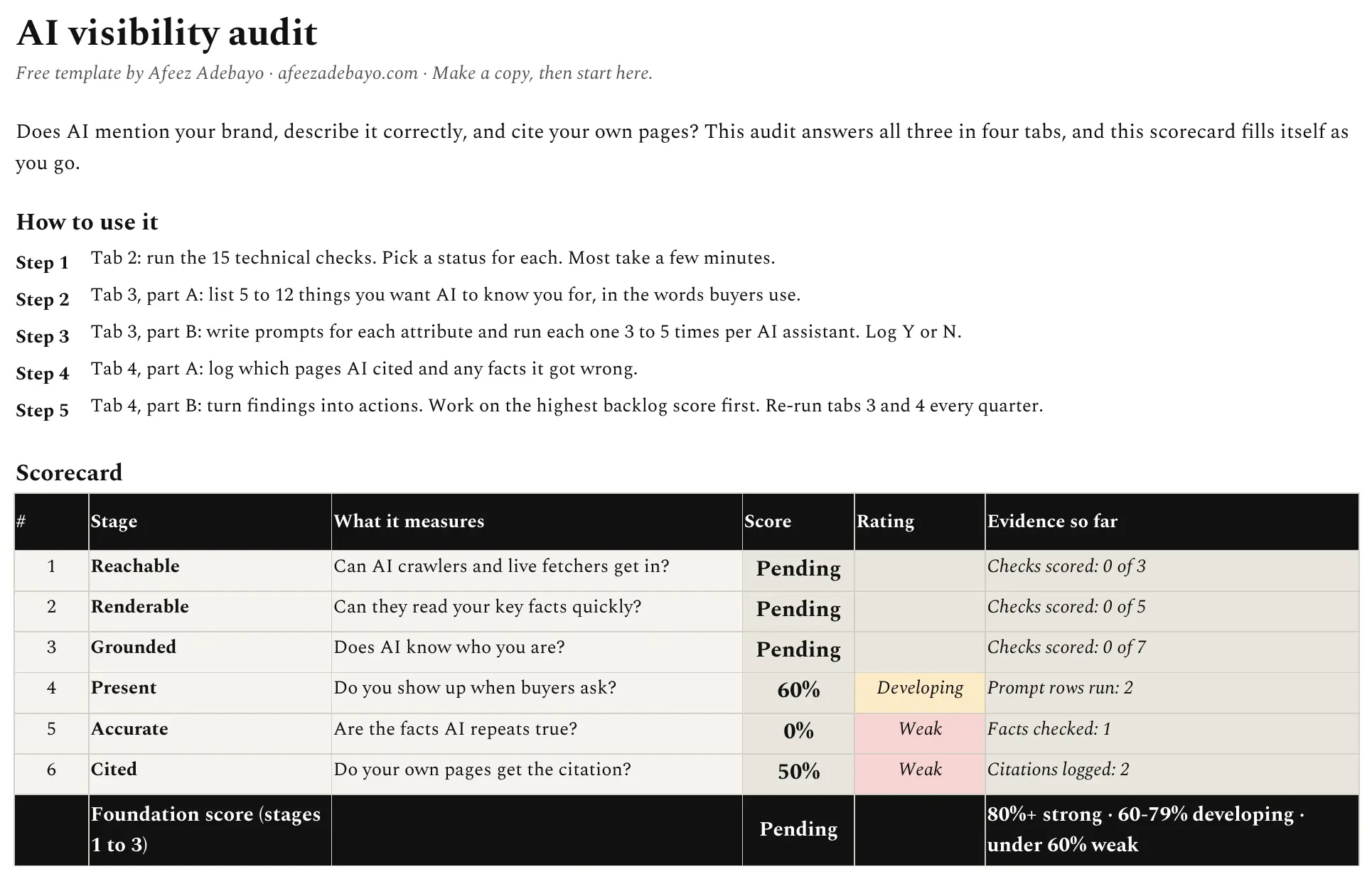
The first tab explains the method in five steps and holds a scorecard that fills itself from the other three tabs. You never type into the scorecard. It scores six stages, in the order AI gets to your brand:
| Stage | The question it answers | Where the data comes from |
|---|---|---|
| 1. Reachable | Can AI crawlers and live fetchers get in? | Tab 2 |
| 2. Renderable | Can they read your key facts quickly? | Tab 2 |
| 3. Grounded | Does AI know who you are? | Tab 2 |
| 4. Present | Do you show up when buyers ask? | Tab 3 |
| 5. Accurate | Are the facts AI repeats true? | Tab 4 |
| 6. Cited | Do your own pages get the citation? | Tab 4 |
Stages 1 to 3 roll up into a foundation score. Above 80% is strong, 60% to 79% is developing, and below 60% is weak. It is a maturity score to track quarter on quarter, not a visibility number.
Tab 2: Technical checks
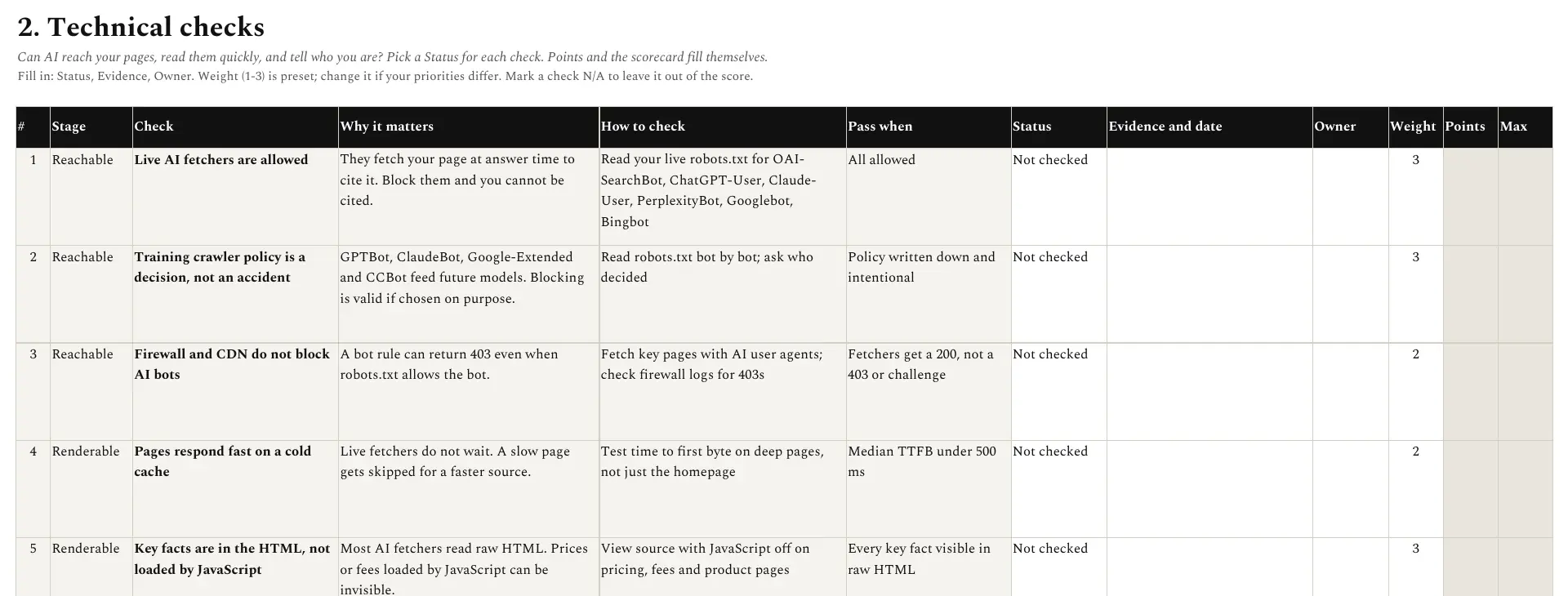
Fifteen checks across the first three stages. Pick a status for each one (Pass, Needs work, Fail or N/A) and the points calculate themselves. Most checks take a few minutes. Four of them deserve extra attention.
Live fetchers and training crawlers are different bots
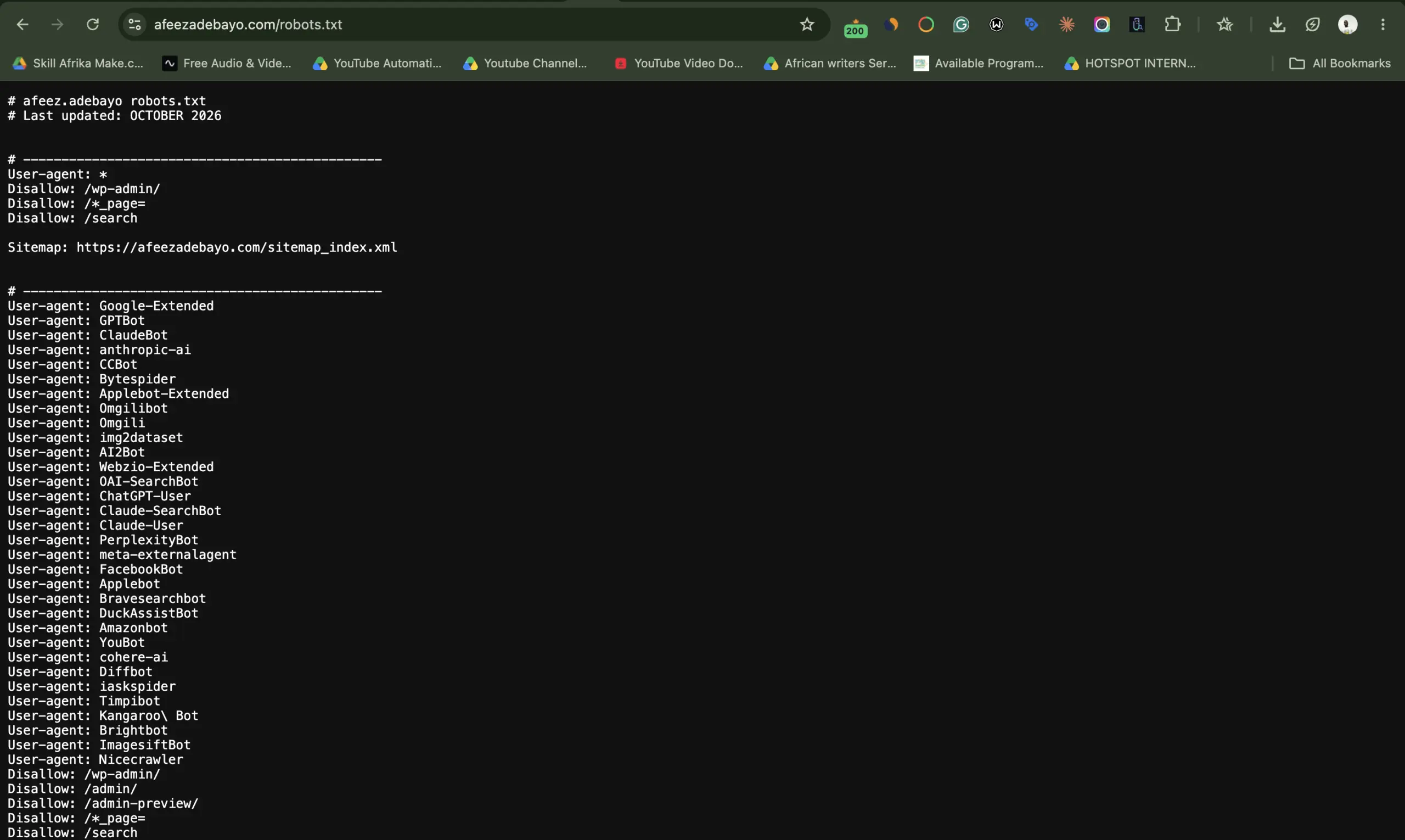
Live fetchers, such as OAI-SearchBot, ChatGPT-User, Claude-User and PerplexityBot, fetch your page at the moment someone asks a question, so they can cite it. Block them and you can’t be cited. Training crawlers, such as GPTBot, ClaudeBot and Google-Extended, collect content for future models. Blocking those is a valid business choice, but it should be a choice someone made on purpose. On my own site, I allow both, and I name each bot in robots.txt so the decision is written down where anyone can see it.
Your firewall can block AI even when robots.txt allows it
This is the check most teams skip. Since 1 July 2025, Cloudflare blocks known AI crawlers by default on every new domain added to its network, unless the owner chooses to allow them. Your robots.txt can say “welcome” while your CDN quietly returns a 403. If your site moved to Cloudflare after that date and nobody touched the AI crawler settings, check them today.
Check this first
In Cloudflare, open your domain’s AI crawler controls and confirm which bots are allowed. Then fetch a key page using an AI user agent and make sure you get a 200, not a 403 or a challenge page.
Speed and JavaScript
Live fetchers don’t wait long. If your deep pages respond slowly on a cold cache, the fetcher may give up and cite a faster page. Aim for a median time to first byte under 500 ms, measured on deep pages, not just the homepage.
Most AI fetchers also read the raw HTML. If your prices, fees or availability load through JavaScript, AI may never see them. Open your pricing page with JavaScript switched off. If the numbers vanish, so do your chances of being quoted correctly.
Your help centre counts as technical SEO here
I added a check for this because it keeps coming up. On a 3,000-page site I worked with, the help centre earned about 21% of the site’s impressions in Google’s AI features in September 2026. If yours sits on a vendor’s domain or is set to noindex, you are giving that away. I covered this in detail in help centre articles as a first-party source.
The last group of checks covers entity grounding: valid Organization schema, sameAs links to your official profiles, an accurate Wikidata entry, and correct third-party profiles with no duplicates. A duplicate listing that says your company is closed can become the answer AI gives.
Tab 3: Prompts and visibility
This is where the audit stops being technical and becomes about your market.
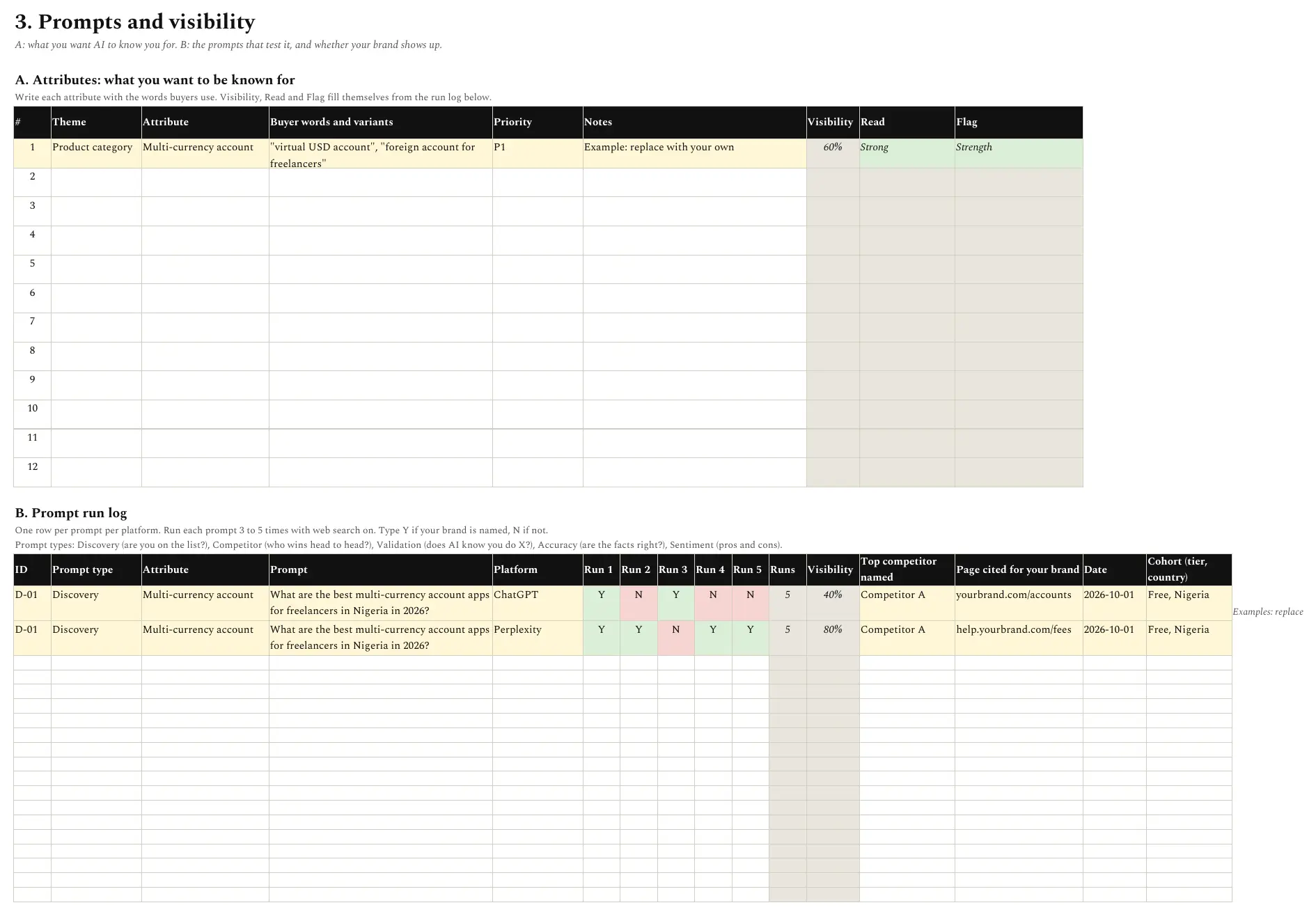
Part A: attributes. List 5 to 12 things you want AI to know you for, grouped by theme: product category, market, pain point, use case, feature, integration, persona, competitor set and trust. For each one, write every phrase buyers use. A “multi-currency account” is also a “virtual USD account” and a “foreign account for freelancers”. A one-word change in a prompt can swing your visibility a lot.
Part B: the prompt run log. Write prompts for each attribute, then run each one three to five times per assistant and log Y if your brand is named, N if not. The template uses five prompt types:
| Type | What it tests | Example |
|---|---|---|
| Discovery | Are you on the list? | “What are the best multi-currency account apps for freelancers in Nigeria in 2026?” |
| Competitor | Who wins head to head? | “[Brand] or [Competitor] for receiving USD as a freelancer?” |
| Validation | Does AI know you do X? | “Does [Brand] offer virtual cards?” |
| Accuracy | Are the facts right? | “What are [Brand]’s withdrawal fees?” |
| Sentiment | How are you judged? | “Is [Brand] safe? What are the pros and cons?” |
Make prompts sound like real people. Nobody types “best multi-currency account”. They type “best way to get paid in dollars as a freelancer in Lagos”. And if your brand name is a common word, add your domain or category to brand-named prompts so the assistant knows which company you mean.
Act on attributes, not single prompts
One prompt is noise. Twenty prompts about one attribute are a signal. The template rolls every run up to the attribute level, labels each one Strong, Building or Weak, and flags any P1 attribute below 50% as an opportunity.
Tab 4: Evidence and actions
Part A: the evidence log. One place for four kinds of evidence:
- Citations. Which pages AI cited, and whether each is yours, a third party’s or a competitor’s.
- Accuracy. Write your official answer, then record what each assistant says. Wrong facts about prices, availability, regulation or company status are your most serious findings.
- Consistency. Check that your site, review profiles, registries and app store listings all state the same facts. AI blends them, so one wrong listing can become the answer.
- Sentiment. Recurring themes in how AI describes you, good and bad.
Accuracy problems are often hiding in plain sight. When I searched how Paystack settles payments in Kenya, Google’s AI Overview said two working days while the top organic result, a third-party tutorial, said one to two business days. Two answers to one question, on the same results page. That is exactly the kind of finding this log is for.
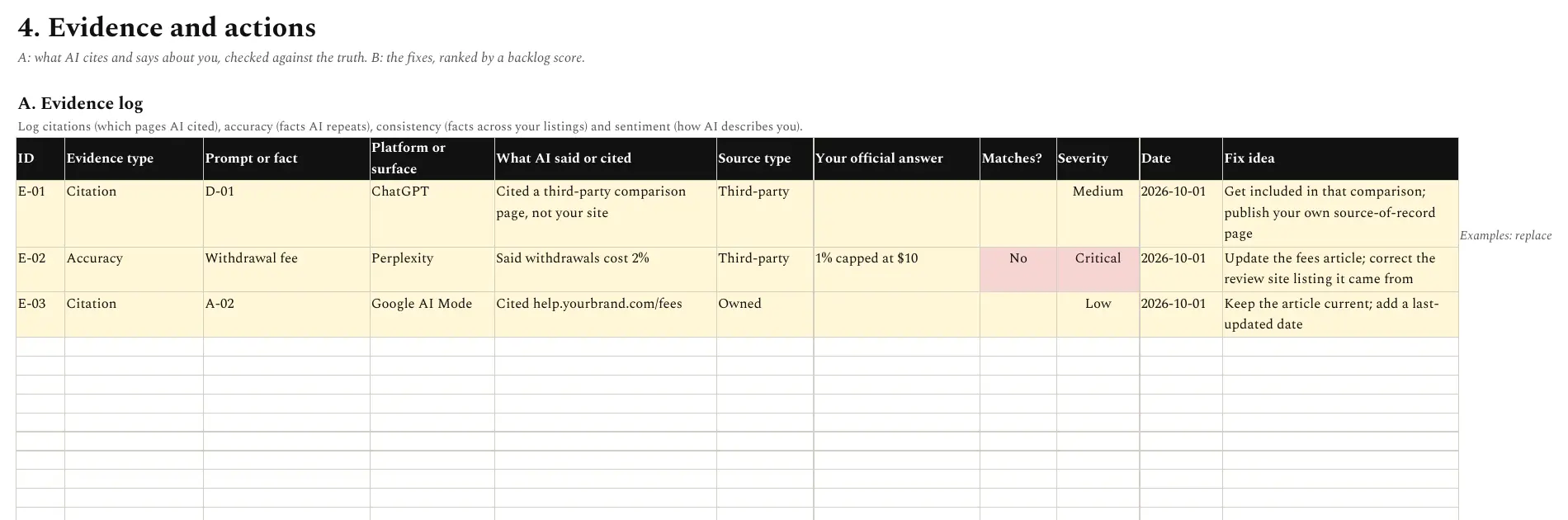
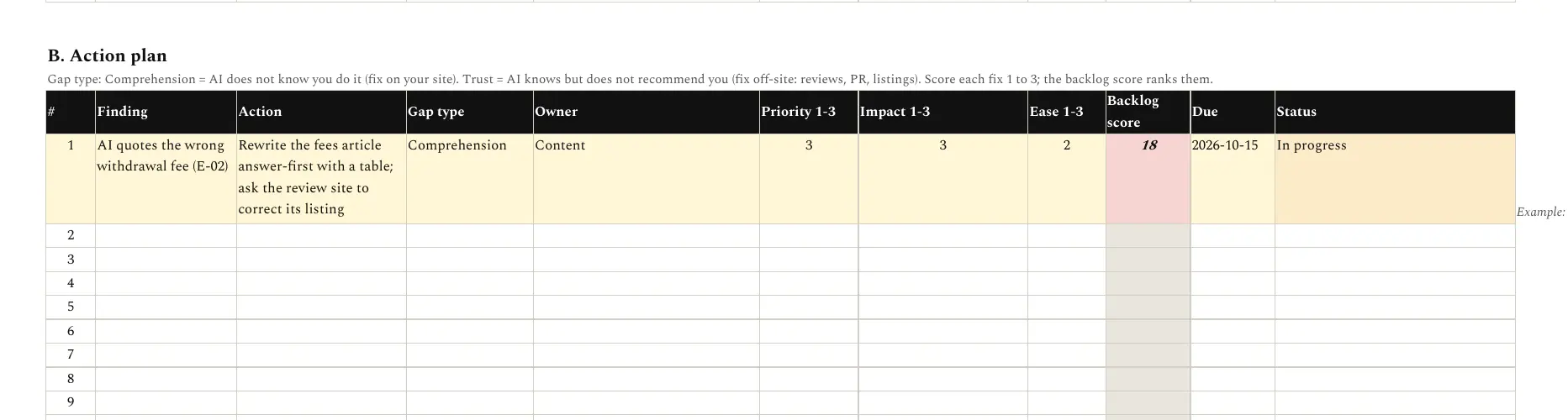
Part B: the action plan. Turn each finding into an owned action. Two fields do most of the work:
- Gap type. If AI knows you offer something but doesn’t recommend you, it is a trust problem: fix it off your site with reviews, coverage and listings. If AI doesn’t know you offer it at all, it is a comprehension problem: fix it on your site with clearer pages, help articles and schema.
- Backlog score. Priority × impact × ease, each scored 1 to 3. It calculates itself, so you work on the highest-value fixes first. Anything scoring 18 or more turns red.
What audits usually find
The same problems come up again and again:
- AI crawlers blocked by a default setting nobody chose, often at the CDN rather than in robots.txt
- Key facts loaded by JavaScript and invisible to AI fetchers
- Out-of-date or duplicate profiles on business registries and review sites
- Regulatory or legal wording that differs between the website and third-party listings
- Strong visibility for prompts that name the brand, weak visibility for category prompts
- Help centre pages earning far more AI citations than their size suggests
The fifth one matters most for growth. If AI only mentions you when someone already types your name, you are not being discovered. You are being looked up.
For the bigger picture on how I approach this work, see my AI search page.
How often to run the audit
Run the full audit once to set a baseline. After that, re-run tabs 3 and 4 every quarter, and re-run tab 2 whenever you change your CDN, robots.txt, site platform or schema. Keep each quarter’s file, so you can show the trend rather than a single snapshot.
Get the free AI visibility audit template
Four tabs, 15 technical checks, a prompt run log and an action plan. The scorecard fills itself. Works in Excel and Google Sheets.
If you want help running the audit or fixing what it finds, get in touch.