You send a writer a keyword and a deadline. The draft comes back targeting the wrong intent, with a 72-character title, no internal links and a statistic nobody can source. Two rounds of edits later, you rewrite half of it yourself.
Most rewrites I’ve seen trace back to the brief, not the writer. When the brief leaves the intent, structure or links open, the writer has to guess, and every guess becomes an edit.
This is the content brief template I use for every SEO article. I’ve used it to brief more than 60 articles in a single month across several writers. Below, I walk through each section and how to fill it in. The template is free, white-labelled and ready to copy.
Quick answer: A content brief tells a writer exactly what to write before they start: the target keyword, search intent, SEO title, meta description, heading structure, links, call to action and schema. A good brief removes guesswork, so the first draft is close to publishable and ready for both search engines and AI answers.
What a content brief should do
A good brief does three jobs:
- It removes decisions from the writer. Keyword, intent, title, structure and links are decided before writing starts.
- It sets rules that never change. Title length, the snippet paragraph, link rules and banned phrases are the same on every article.
- It creates one shared checklist. The writer and the SEO lead tick the same list before anything goes live.
The template has seven sections. The SEO lead fills in sections 1 to 6. The writer drafts from them and completes section 7 before handing back.
Article info: title, slug and owner
Start with the basics: working title, URL slug, blog category, assigned writer and target publish date.
My slug rules are simple. Lowercase, hyphens only, five words or fewer, and no years or numbers. A slug like /best-crm-tools-2024 is out of date the day the year changes, and you either live with it or redirect it.
Section 1: Keywords and search intent
Primary keyword. Record the keyword, monthly search volume, keyword difficulty and target market. Paste the three URLs ranking first to third. They show the writer what structure Google is rewarding. They are never something to copy.
Secondary keywords. List up to six, each with volume, difficulty and a suggested placement: an H2 or a supporting paragraph.
Search intent. Pick one:
- Informational: the reader wants to learn. Lead with a direct answer, then explain.
- Commercial investigation: the reader is comparing options. Include a section on where your product fits, with honest trade-offs.
- Transactional: the reader is ready to act. Put a clear call to action high on the page.
Then add one sentence of intent notes. “Informational. The reader wants to understand what a SEPA transfer is before choosing how to send money. Lead with the definition.” That one sentence prevents most wrong-intent drafts.
Mistake to avoid
Choosing intent from the keyword alone. “Best payroll software” sounds commercial, but if the top results are all buyer’s guides, the writer needs to write a guide, not a sales page. Look at what is ranking before you decide.
Section 2: SEO title and meta description
SEO title rules:
- 50 to 60 characters
- Primary keyword in the first four words
- End with your brand suffix, for example ” | Brand”
- Never use the brand name twice
- Formula: {Primary keyword} {value modifier} | Brand
Meta description rules:
- 140 to 155 characters
- Primary keyword used once, naturally
- End with a call-to-action verb: Start, Send, Open, Compare, Apply or Get
- Formula: {Outcome statement}. {Differentiator}. {CTA}.
The template has a character count field beside each one. Counting is boring, but it stops titles being cut off in results, and it means nobody argues about it in review.
Section 3: Article structure
This is the section that matters most, for search and for AI answers.
Featured snippet paragraph. The SEO lead writes a 40 to 60 word answer to the article’s main question. It sits before the first H2, within the first 200 words. The writer can improve the wording but can’t remove it or move it lower.
Why this matters for AI answers
A short, complete answer near the top of the page is the easiest thing for a search feature or an AI assistant to lift and cite. If the answer is buried under three paragraphs of background, someone else’s clearer page gets quoted instead.
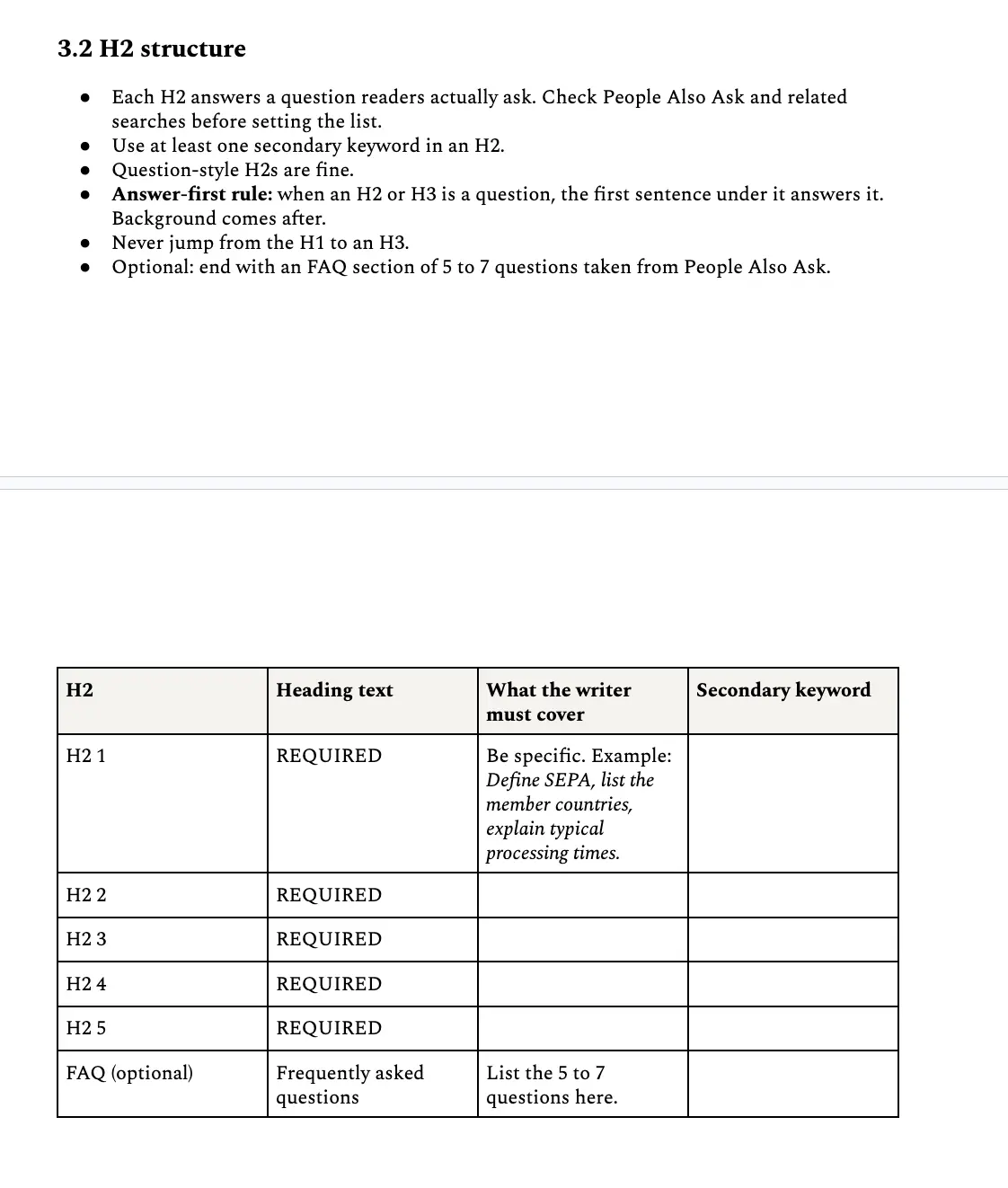
H2 structure. Every H2 answers a question readers actually ask. Check People Also Ask and related searches before you set the list. The rules:
- Use at least one secondary keyword in an H2.
- Question-style H2s are fine.
- Answer-first rule: when a heading is a question, the first sentence under it answers it. Background comes after.
- Never jump from the H1 to an H3.
For each H2, tell the writer exactly what to cover. “Define SEPA, list the member countries, explain typical processing times” is a brief. “Talk about SEPA” is not.
Word count, format and images. Set one target number, not a range. Informational guides usually land between 1,500 and 2,500 words. Note any required formats, such as a numbered list or a comparison table. Ask for at least one image per 500 words, and describe what each one shows, where it goes and its alt text. Real screenshots and data beat stock photos every time.
Section 4: Internal and external links
Internal links. At least three, placed in the body where they fit naturally, never as a block at the bottom.
- Every article links to at least one product or service page.
- Link to at least one related blog article.
- Never link to the homepage when a more specific page exists.
- Anchor text describes the destination. Never “click here” or “learn more”.
The template has a table for each link: destination URL, anchor text and the H2 it belongs in. Deciding links in the brief is far faster than adding them in edit.
External links. Three at most, none in the first two paragraphs, and only from authoritative sources such as government sites, regulators and major news outlets. Never link to a direct competitor.
One rule I enforce without exception: every third-party statistic links directly to its original source. If it can’t be linked, it gets removed. A statistic that traces back to a blog quoting another blog is how wrong numbers spread, and AI assistants repeat them.
Section 5: Call to action
Specify the exact CTA text, the URL it points to and where it appears. Informational articles get one CTA at the end. Commercial articles get one at the end and one after the comparison section. Always point to a specific page, not the homepage.
Section 6: Schema markup
The SEO lead specifies the schema and provides a validated JSON-LD block. The writer pastes it exactly as given. My defaults for blog articles:
- BlogPosting (or Article) and BreadcrumbList on every article
- FAQPage when the article has a visible FAQ section
- ItemList for ranked lists of products or tools
- VideoObject when a video is embedded
Notice what is missing: HowTo. Google stopped showing HowTo rich results in 2023, and FAQ rich results stopped appearing in Google Search in May 2026. I still add FAQPage when there is a real FAQ, because it describes the page’s questions and answers clearly to any machine reading it. Just don’t promise anyone a rich result from it.
Validate every block in the Schema Markup Validator and publish with zero errors. My technical SEO page covers how I handle schema at site level.
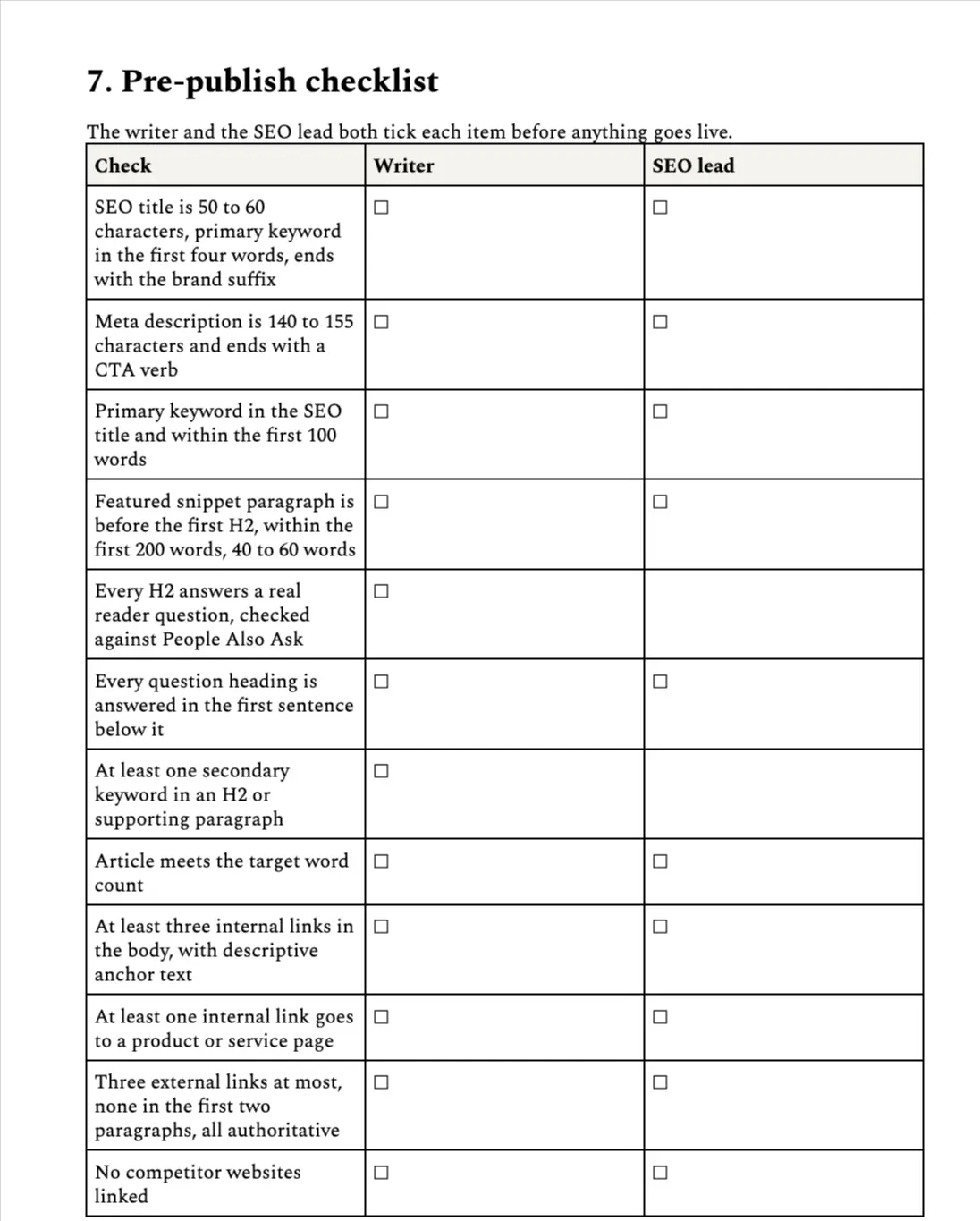
Section 7: Pre-publish checklist
The writer and the SEO lead both tick every item. The checklist has a column for each, so it is always clear who checked what. The main checks:
- SEO title is 50 to 60 characters, with the keyword in the first four words
- Meta description is 140 to 155 characters and ends with a CTA verb
- Primary keyword appears in the first 100 words
- Snippet paragraph is before the first H2 and 40 to 60 words
- Every question heading is answered in its first sentence
- At least three internal links with descriptive anchors
- Every statistic links to its original source
- Images are WebP, under 200 KB, with alt text and dimensions set
- No banned phrases from your style guide
- Schema validates with zero errors and the canonical is in place
How to roll the template out to a team
- Lock the master. Writers make a copy for each article. Nobody edits the original.
- Co-own it with your content lead. A template that SEO owns alone gets ignored. One the content team helped shape gets used.
- Run a 15-minute kick-off for new writers. Walk through one completed brief, section by section.
- Change rules in one place. When a rule changes, update the master and tell the team the same day.
Using AI writing tools?
A detailed brief makes AI drafts far more accurate. Paste the filled-in brief as the instructions, then edit the draft against the section 7 checklist. The brief does the thinking; the tool only does the typing.
Once your briefs are consistent, the next step is checking whether the content actually gets picked up by AI assistants. My AI visibility audit template covers that, and my content strategy page shows how briefs fit into the wider plan.
Get the free content brief template
Seven sections, from keywords to a pre-publish checklist. White-labelled and ready for your team.
If you want help setting up a brief process for your team, get in touch.